
©2021 Reporters Post24. All Rights Reserved.

It’s no surprise that One UI is widely regarded as one of the most feature-rich custom Android skins. With One UI 8, Samsung not only builds on the already vast offerings but also brings numerous enhancements to Galaxy AI, as noted in our Galaxy Z Fold7 review. While One UI 8 began rolling out to the Galaxy S25 series in September 2025, the smartphone giant has already announced One UI 8.5, which is expected to roll out later this year.
On that note, if you’re curious when your Galaxy device is expected to receive One UI 8, how to update to it, or what features it introduces, below is your one-stop guide.
What is One UI 8 based on?
One UI 8 is based on Android 16, which Google began rolling out to eligible Pixel smartphones earlier in 2025. While Android 16 brings core system-level improvements, including better performance efficiency, enhanced privacy controls, and refined background app management, Samsung layers its own design language and feature additions on top through One UI 8.
This means Galaxy users get the best of both worlds: Google’s Android 16 upgrades combined with Samsung-exclusive features such as Galaxy AI enhancements, deeper customisation, and ecosystem-level integrations across Galaxy devices.
Samsung devices eligible for One UI 8/ 8.5 update
Shortly after Google began rolling out Android 16 to eligible Pixel smartphones, Samsung rolled out One UI 8 to its current flagship lineup, the Galaxy S25 series, in September 2025. This was followed by the Galaxy S24 and S23 series getting the update.
In early December 2025, the smartphone giant announced the One UI 8.5 update, which is expected to deliver improved productivity, privacy, and performance across its devices. While not officially stated, all devices running or confirmed to receive the One UI 8 update will also receive One UI 8.5 when it’s available. The update will first be rolled out to the Galaxy S25 series, likely after the Galaxy S26 series launches in February 2026.
| Series | One UI 8 release timeline |
|---|---|
| S-Series | Sept-Oct 2025: Galaxy S25 Ultra, Galaxy S25 Plus, Galaxy S25 Edge, Galaxy S25, Galaxy S24 Ultra, Galaxy S24 Plus, Galaxy S24, Galaxy S23 Ultra, Galaxy S23 Plus, Galaxy S23, Galaxy S23 FE, Galaxy S22 Ultra, Galaxy S22 Plus, Galaxy S22, Galaxy S21 FE 5G |
| Z-Series | Sept-Oct 2025: Galaxy Z Flip6, Galaxy Z Fold6, Galaxy Z Flip5, Galaxy Z Fold5, Galaxy Z Flip4, Galaxy Z Fold4 |
| A-Series | Oct-Nov 2025: Galaxy A73, Galaxy A56, Galaxy A55, Galaxy A54, Galaxy A53, Galaxy A36, Galaxy A35, Galaxy A34, Galaxy A33, Galaxy A26, Galaxy A25, Galaxy A24 5G, Galaxy A17, Galaxy A16 5G, Galaxy A16, Galaxy A15, Galaxy A15 5G, Galaxy A06, Galaxy A06 5G |
| M-Series | Oct-Nov 2025: Galaxy M56 5G, Galaxy M55s 5G, Galaxy M36 5G, Galaxy M35 5G, Galaxy M34 5G, Galaxy M16 5G, Galaxy M15 5G, Galaxy M06 5G, Galaxy M33 5G, Galaxy M53 5G, Galaxy M05 |
| F-Series | Oct-Nov 2025: Galaxy F56 5G, Galaxy F55 5G, Galaxy F54 5G, Galaxy F36 5G, Galaxy F34 5G, Galaxy F17 5G, Galaxy F16 5G, Galaxy F15 5G, Galaxy F06 5G, Galaxy F05 |
| Galaxy Tab Series | Oct-Nov 2025: Galaxy Tab S10 Lite 5G, Galaxy Tab S10 Lite, Galaxy Tab S10 Ultra 5G, Galaxy Tab S10 Ultra, Galaxy Tab S10+ 5G, Galaxy Tab S10 FE+ 5G, Galaxy Tab S10 FE+ Wi-Fi, Galaxy Tab S10 FE 5G, Galaxy Tab S10 FE, Galaxy Tab S9 FE+ 5G, Galaxy Tab S9 FE+, Galaxy Tab S9 FE 5G, Galaxy Tab S9 FE, Galaxy Tab S9 Ultra 5G, Galaxy Tab S9 Ultra, Galaxy Tab S9+ 5G, Galaxy Tab S9+, Galaxy Tab S9 5G, Galaxy Tab S9, Galaxy Tab S8 Ultra 5G, Galaxy Tab S8 Ultra, Galaxy Tab S8+ 5G, Galaxy Tab S8+, Galaxy Tab S8 5G, Galaxy Tab S8, Galaxy Tab A11 Wi-Fi, Galaxy Tab A11, Galaxy Tab S10+, Galaxy Tab A9+ 5G, Galaxy Tab A9+, Galaxy Tab A9 LTE, Galaxy Tab A9 |
| XCover | October 2025: Galaxy XCover7 |
Note: Since Samsung hasn’t released the official rollout schedule for One UI 8.5, the table above only reflects the One UI 8 release timeline.
Samsung devices that have already received One UI 8
| Series | Models |
|---|---|
| S-Series | Galaxy S25 Ultra, Galaxy S25 Plus, Galaxy S25 Edge, Galaxy S25, Galaxy S24 Ultra, Galaxy S24 Plus, Galaxy S24, Galaxy S25 FE, Galaxy S23 Ultra, Galaxy S23 Plus, Galaxy S23, Galaxy S23 FE, Galaxy S22 Ultra, Galaxy S22 Plus, Galaxy S22, Galaxy S21 FE 5G |
| Z-Series | Galaxy Z TriFold, Galaxy Z Flip7, Galaxy Z Fold7, Galaxy Z Flip6, Galaxy Z Fold6, Galaxy Z Flip5, Galaxy Z Fold5, Galaxy Z Flip4, Galaxy Z Fold4 |
| A-Series | Galaxy A73, Galaxy A56, Galaxy A55, Galaxy A54, Galaxy A53, Galaxy A36, Galaxy A35, Galaxy A34, Galaxy A33, Galaxy A26, Galaxy A25, Galaxy A24 5G, Galaxy A17, Galaxy A16 5G, Galaxy A16, Galaxy A15, Galaxy A15 5G, Galaxy A06, Galaxy A06 5G |
| M-Series | Galaxy M56 5G, Galaxy M55s 5G, Galaxy M36 5G, Galaxy M35 5G, Galaxy M34 5G, Galaxy M17 5G, Galaxy M16 5G, Galaxy M15 5G, Galaxy M06 5G, Galaxy M33 5G, Galaxy M53 5G, Galaxy M05 |
| F-Series | Galaxy F56 5G, Galaxy F55 5G, Galaxy F54 5G, Galaxy F36 5G, Galaxy F34 5G, Galaxy F17 5G, Galaxy F16 5G, Galaxy F15 5G, Galaxy F06 5G, Galaxy F05 |
| Galaxy Tab Series | Galaxy Tab S10 Lite 5G, Galaxy Tab S10 Lite, Galaxy Tab S10 Ultra 5G, Galaxy Tab S10 Ultra, Galaxy Tab S10+ 5G, Galaxy Tab S10 FE+ 5G, Galaxy Tab S10 FE+ Wi-Fi, Galaxy Tab S10 FE 5G, Galaxy Tab S10 FE, Galaxy Tab S9 FE+ 5G, Galaxy Tab S9 FE+, Galaxy Tab S9 FE 5G, Galaxy Tab S9 FE, Galaxy Tab S9 Ultra 5G, Galaxy Tab S9 Ultra, Galaxy Tab S9+ 5G, Galaxy Tab S9+, Galaxy Tab S9 5G, Galaxy Tab S9, Galaxy Tab S8 Ultra 5G, Galaxy Tab S8 Ultra, Galaxy Tab S8+ 5G, Galaxy Tab S8+, Galaxy Tab S8 5G, Galaxy Tab S8, Galaxy Tab A11 Wi-Fi, Galaxy Tab A11, Galaxy Tab S10+, Galaxy Tab A9+ 5G, Galaxy Tab A9+, Galaxy Tab A9 LTE, Galaxy Tab A9 |
| XCover | Galaxy XCover7 |
How to check your current One UI version
If you’re unsure whether your Galaxy phone is already running One UI 8 or an older version, here’s how to check:
Step 1: Open the Settings app
Step 2: Scroll down and tap About phone
Step 3: Select Software information
Step 4: Look for the One UI version listed on the screen
If it shows One UI 8, your device has already received the update. If it shows an older version, you can manually check for updates using the steps below.
How to update a Samsung phone to One UI 8
When the One UI 8 or 8.5 update becomes available for your device, you’ll receive an OTA notification. However, if you’ve disabled “Auto download” updates, here’s how you can manually check for the update:
Step 1: Open the Settings app on your Samsung phone or tablet
Step 2: Scroll down and select Software update
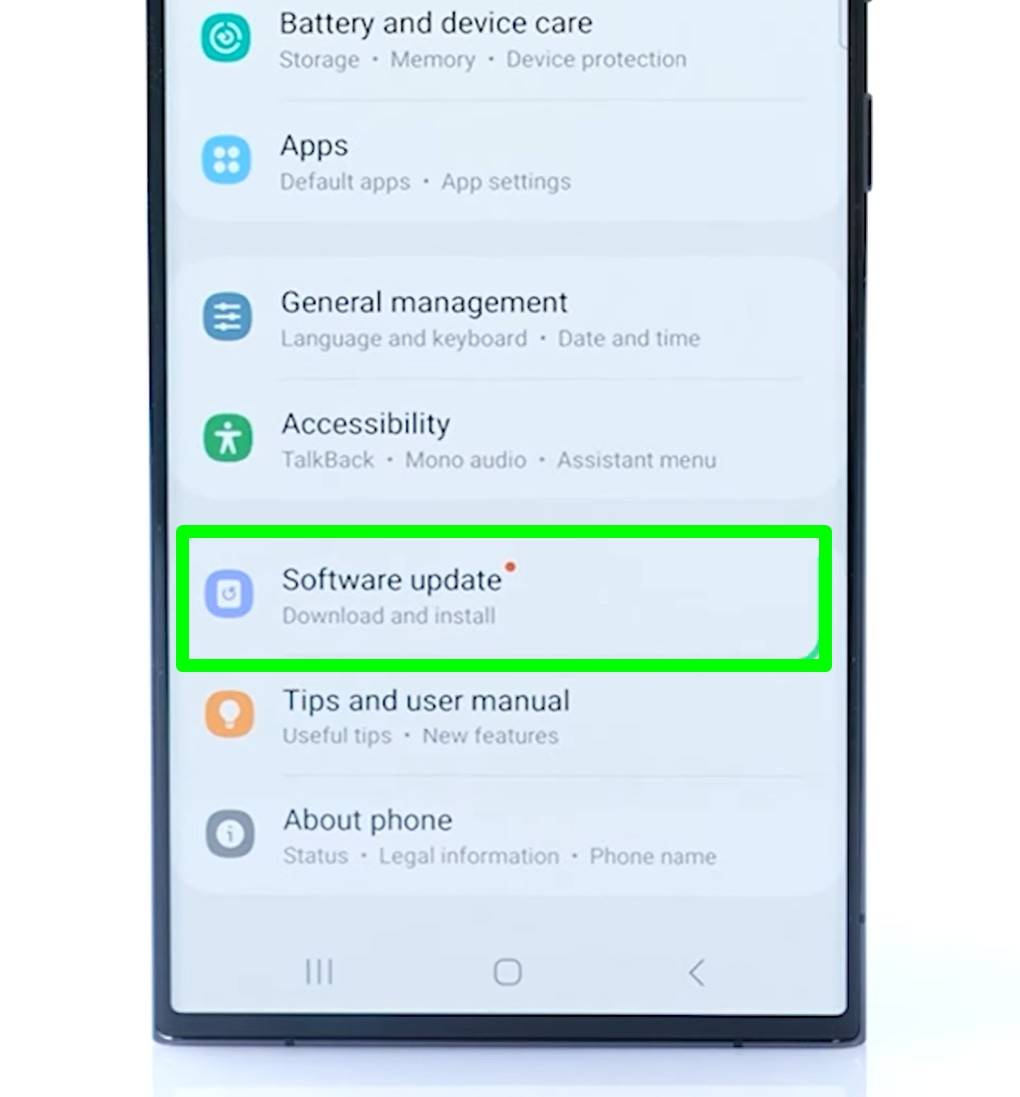
Step 3: On the next screen, tap Download and install
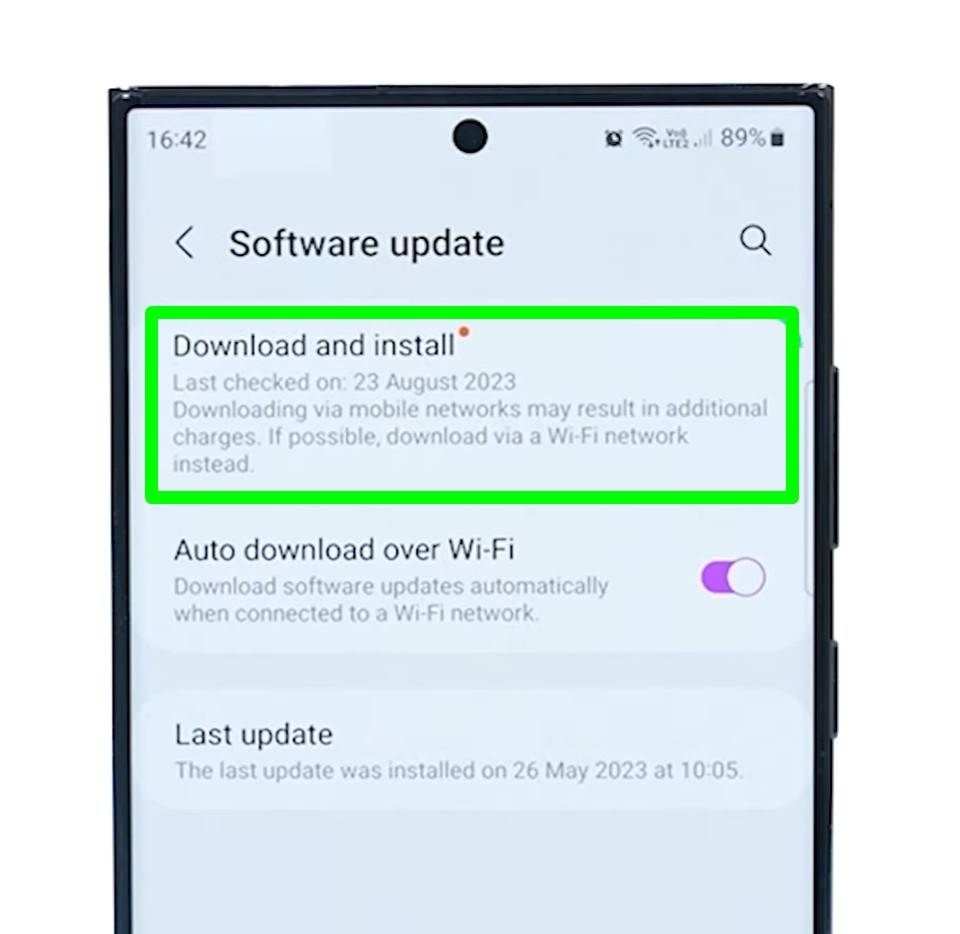
Step 4: The next page will prompt you to download and install the update, if available. Tap Install now. If needed, you can also schedule the auto-installation for a later time by selecting the Schedule install option
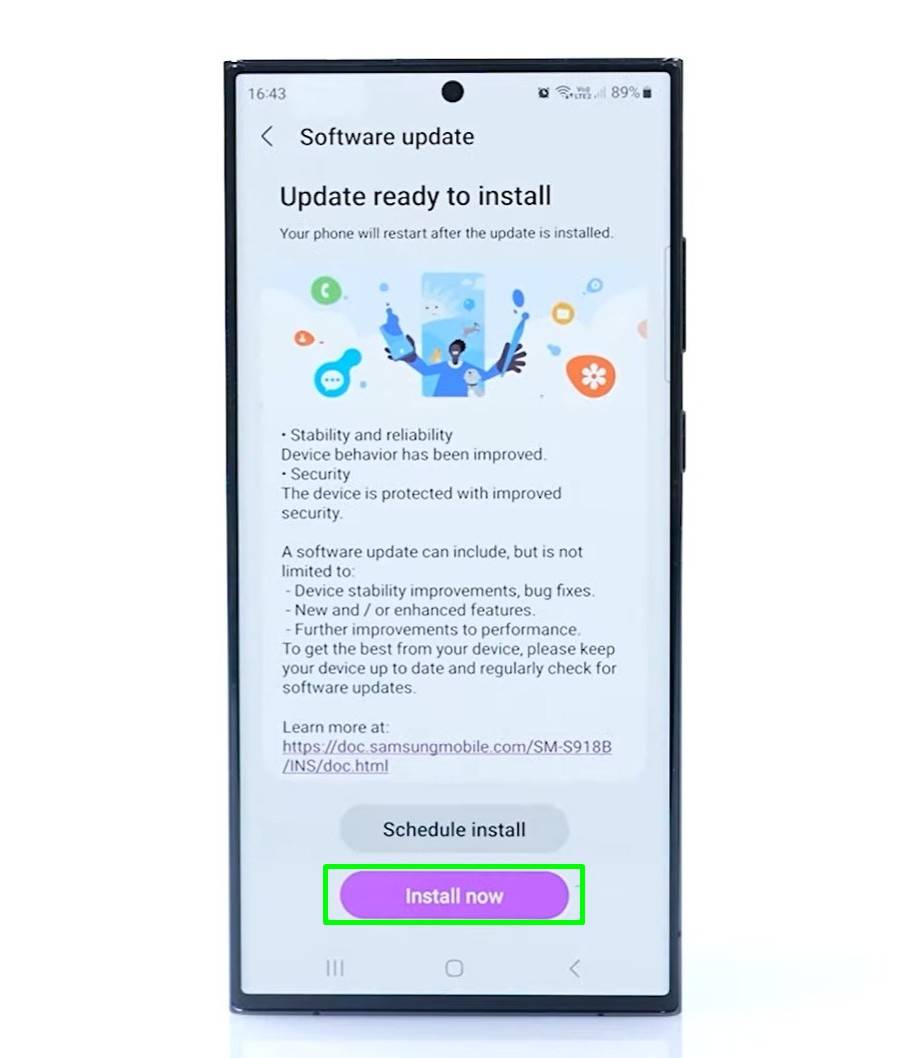
Step 5: Once the download begins, the phone will install the update and eventually boot up on One UI 8
New changes and features on One UI 8
From One UI 7 to One UI 8, users will experience enhanced Galaxy AI features and functions, stronger security and privacy, productivity enhancements, and refined visual elements across several areas. On the other hand, One UI 8.5 is set to bring better customisation and ecosystem-based features.
Improvements to Galaxy AI: The Galaxy AI suite, which debuted with One UI 7, has been upgraded across the board to deliver faster, more reliable results on the go. The upgraded features include Call Assist, Transcript Assist, Writing Assist, Photo Assist, and Audio Eraser.
Better multitasking: Initially available on ColorOS- and OxygenOS-based phones, One UI 8 lets users open two apps in split-screen mode with a 90:10 split. This means one app takes 90 percent of the screen, while the other one stays at a 10 percent view. When tapping on the smaller-sized app, it automatically expands to take up 90 percent of the screen.
Lockscreen changes: The lockscreen clock in One UI 8 is now dynamic, meaning it can wrap around the main elements of a wallpaper, such as people or animals.
New ‘Hide content’ option: Within Notification settings, there’s a new ‘Hide content’ option, using which you can select the specific apps you wish to display notifications from on the lockscreen.
Quick Share redesign: The Quick Share app is redesigned with Receive and Send tabs. The Receive tab lets anyone share media with you, while the Send tab lets you share files with others.
Secure Folder changes: Users can set a dedicated fingerprint for Secure Folder, separate from the one used for the lock screen. Apps can now also be hidden within the Secure Folder.
Also read: Android 16 update roundup: release timeline, eligible phones, features, and more
Should you update to One UI 8?
If your Galaxy device is eligible for One UI 8 and the update is available in your region, it is generally recommended to install the stable build.
The update delivers performance improvements, enhanced Galaxy AI features, and security patches based on Android 16. In most cases, users report smoother animations and better background app management compared to One UI 7.
However, if the update is still rolling out, it may be wise to wait a few days and check for early user feedback, especially on older devices. As with any major software upgrade, backing up your data before installation is strongly advised.
If you are part of the beta programme, keep in mind that beta builds may contain bugs or unfinished features. Stable releases are typically more reliable for everyday use.
What features and changes to expect on One UI 8.5
With the One UI 8.5 update just around the corner, here are the confirmed and some rumoured features of the upcoming One UI release:
Enhanced Photo Assist: Photo Assist is One UI’s AI-based image editor found in the Gallery app. On One UI 8.5, users can apply additional edits on top of existing edits to achieve the desired image result. This creates layers of edits, from which one can pick the one to keep.
Recognition-based Quick Share: When sharing images containing people, Quick Share can recognise the people in the image and display the person’s contact in the sharing menu accordingly.
Audio Broadcast: This feature lets users wirelessly send audio to multiple nearby headphones, earbuds, or other compatible devices simultaneously. Users can use their Samsung phone’s built-in microphone to broadcast their voice live, making it a useful feature for communicating with others in a group setting, such as a guided tour or event.
Theft protection: When a Samsung smartphone running One UI 8.5 is lost or stolen, Failed Authentication Lock instantly locks the screen if the PIN, password, or biometrics don’t match the owner’s. This works not only on the lock screen but also in Secure Folder.
Updated quick settings panel: The split quick settings panel introduced on One UI 7 is getting a major addition. All sections, including the brightness and volume sliders, can be resized to 1×1 or 1×2 layouts. The sliders can even be placed vertically instead of the traditional horizontal form.
Floating bottom tabs: Several first-party apps, such as Phone, Gallery, and Clock, use a bottom-tab design in which the entire section is separated from the footer.
Weather alarm backgrounds: When an alarm sounds, it displays the current weather condition on a visually animated background. For this to work, ensure you’ve granted the Clock app location permissions.
FAQs
When was One UI 8 released?
One UI 8 was officially released as a beta firmware for the Samsung Galaxy S25, S25 Plus, and S25 Ultra in May 2025, while the Galaxy Z Fold7 and Z Flip7 were the first smartphones to come with One UI 8 out of the box in July 2025. The stable rollout began in September 2025 for the Galaxy S25 series, followed by older S-series models. The One UI 8.5 beta programme is live for eligible devices, including the S25 series.
Is One UI 8 better than previous versions?
Many users report smoother performance, prettier animations, and more useful AI. It’s one of Samsung’s fastest major updates, thanks to Google’s faster Android 16 rollout.
How much storage space does One UI 8 require?
While Samsung doesn’t explicitly state the storage required to download and install One UI 8, the update itself weighs around 4GB, at least on the Galaxy S25 series. Regardless, users should ensure there is sufficient free space before updating, such as 30 to 40GB, to make room for self-optimisations post-update.
Will One UI 8 slow down older phones?
While major updates often improve overall phone performance, including speed, if you’re concerned about your phone slowing down, it’s better to refer to initial impressions from users who’ve already updated to One UI 8. This can be done by visiting platforms like Reddit or Samsung Community and seeking others’ experiences with the same phone you use.
Can I downgrade from One UI 8?
You can downgrade from One UI 8 to One UI 7, but it requires installing unofficial software on your PC. Downgrading will also erase all your data from your Samsung smartphone.

Comments are closed.